 Loading...
Two cables short of a workstation. The QZ USB 4.0 lineup, explained.
Published On 05/02/2026 11:26 AM by QZ Support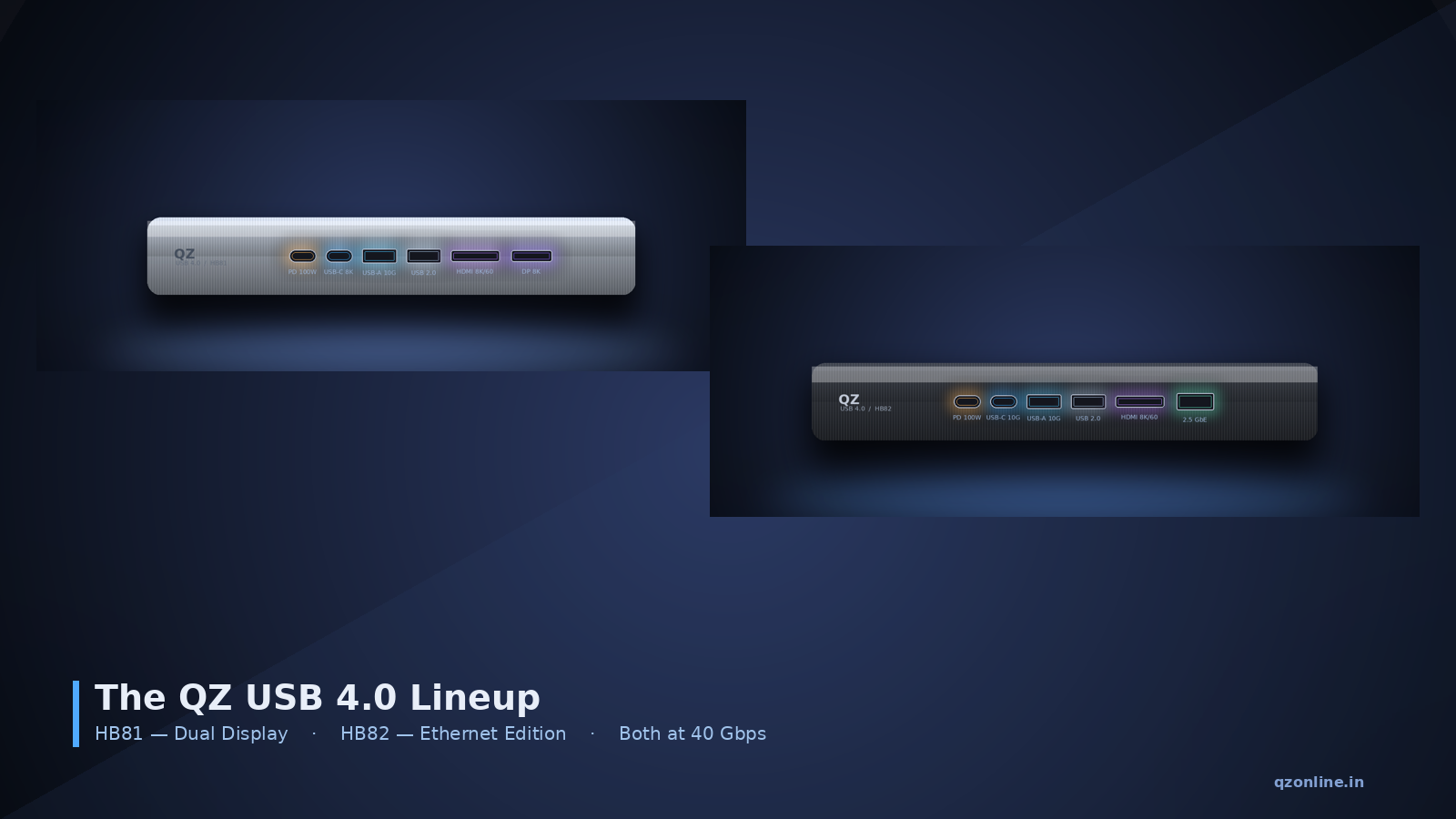
QZ-HB81 for creators who live across two displays. QZ-HB82 for desks that need fast wired networking. Both built on the full 40 Gbps USB 4.0 spec.
Plug a single USB-C cable into your laptop. On the other end, an 8K monitor lights up. A second display picks up alongside it. An external NVMe drive mounts at full speed. Your laptop charges at 85 watts. Your keyboard, mouse, and webcam come along for the ride.
Or — same cable, different hub — you skip the second display and pull a 2.5 Gbps wired network connection instead. Lower latency. Faster repo clones. Stable video calls without depending on Wi-Fi.
That choice — display-rich versus network-rich — is what the new QZ USB 4.0 lineup is built around. Two SKUs, QZ-HB81 and QZ-HB82, both running the full 40 Gbps USB 4.0 spec. Each picks a different second-job for the bandwidth USB 4.0 unlocks.
Two throughput tiers ship today: 20 Gbps (Gen 2x2) and 40 Gbps (Gen 3x2). For a hub that drives an 8K display while running storage, networking, and USB peripherals concurrently, only the 40 Gbps tier holds up. Both QZ hubs are 40 Gbps Gen 3x2 — the full tier.
Both hubs share the 40 Gbps USB 4.0 spine. The difference is what they trade for the second downstream slot — a display or an Ethernet port.
Pick the QZ-HB82 if you live on Wi-Fi but wish you didn't — developers pulling large repos, finance and trading desks, hybrid workers on packed networks, and anyone who joins five video calls a day. Wired 2.5 GbE is the upgrade that actually changes how your day feels.
If your workload is mostly a webcam, a keyboard, and a single 1080p display, an older USB 3.2 hub is still fine. The USB 4.0 upgrade story sharpens the further your workflow leans on bandwidth, displays, or networking.
Pair either with a certified 40 Gbps cable and a USB 4.0 host (most laptops shipped from late 2022 onwards) and the spec on the box matches the experience on your desk. That is rarer than it should be. Explore the lineup → QZ-HB81 (Dual Display) · QZ-HB82 (Ethernet)
Looking for more I/O? Browse the wider QZ range — Thunderbolt 4 docks, USB 3.2 hubs, externally powered hubs, SATA-to-USB cables and USB-C adapters at qzonline.in.
Plug a single USB-C cable into your laptop. On the other end, an 8K monitor lights up. A second display picks up alongside it. An external NVMe drive mounts at full speed. Your laptop charges at 85 watts. Your keyboard, mouse, and webcam come along for the ride.
Or — same cable, different hub — you skip the second display and pull a 2.5 Gbps wired network connection instead. Lower latency. Faster repo clones. Stable video calls without depending on Wi-Fi.
That choice — display-rich versus network-rich — is what the new QZ USB 4.0 lineup is built around. Two SKUs, QZ-HB81 and QZ-HB82, both running the full 40 Gbps USB 4.0 spec. Each picks a different second-job for the bandwidth USB 4.0 unlocks.
USB 4.0 is the first revision where a hub stops being a dongle and starts being a dock. Both QZ hubs are built for the spec from the ground up.
What USB 4.0 actually is
USB 4.0 is the first version of USB built on Thunderbolt 3 at the protocol layer — Intel contributed the spec to the USB Implementers Forum so the same fabric could ship on any device, not just a select list of premium laptops. The result is a single 40 Gbps Type-C link that can carry USB data, DisplayPort video, and PCIe traffic at the same time, with the host and the hub negotiating how to slice the pipe based on what is plugged in.Two throughput tiers ship today: 20 Gbps (Gen 2x2) and 40 Gbps (Gen 3x2). For a hub that drives an 8K display while running storage, networking, and USB peripherals concurrently, only the 40 Gbps tier holds up. Both QZ hubs are 40 Gbps Gen 3x2 — the full tier.
QZ-HB81 — the Dual Display creator hub
The HB81 is built for desks where the second monitor is non-negotiable. It carries HDMI 2.1 and DisplayPort 2.1 simultaneously, so you can drive a single 8K reference monitor at 60 Hz, a pair of 4K monitors at 60 Hz each, or — using MST — an 8K main display alongside a 4K secondary. The dedicated USB-C downstream port doubles as a third 8K video output for capture cards or external displays that prefer Type-C.- HDMI 2.1 — 8K @ 60 Hz for native 8K reference monitors and high-refresh 4K panels.
- DisplayPort 2.1 — 8K @ 30 Hz with DP-Alt Mode passthrough for studio-class displays.
- USB-C — 8K video or 10 Gbps data: negotiable as a third display or a fast NVMe link.
- USB-A 10 Gbps plus USB 2.0 for keyboards, mice and accessories.
- USB-C PD-IN — 100 W: the hub draws 15 W, leaves 85 W to charge the host.
QZ-HB82 — the Ethernet workstation hub
The HB82 trades the second display output for a real 2.5 Gigabit wired Ethernet port — a meaningful upgrade over the 1 GbE that ships in most laptops, and a relief in any environment where Wi-Fi is congested or video calls drop. It still drives an 8K HDMI display, charges the laptop, and runs a fast NVMe drive — just with networking instead of a second monitor.- HDMI 2.1 — 8K @ 60 Hz for a single high-resolution display.
- 2.5 Gigabit Ethernet for low-latency wired networking — 2.5× the bandwidth of standard 1 GbE.
- USB-C 10 Gbps for fast SSDs and capture devices.
- USB-A 10 Gbps plus USB 2.0 for legacy peripherals.
- USB-C PD-IN — 100 W, with 85 W passed through to the host.
HB81 vs HB82 — at a glance
| Spec | QZ-HB81 · Dual Display | QZ-HB82 · Ethernet Edition |
|---|---|---|
| Upstream bandwidth | 40 Gbps | 40 Gbps |
| HDMI | HDMI 2.1, up to 8K @ 60 Hz | HDMI 2.1, up to 8K @ 60 Hz |
| DisplayPort | DisplayPort 2.1, up to 8K @ 30 Hz | — |
| USB-C downstream | 1 × 8K video / 10 Gbps data | 1 × 10 Gbps data |
| USB-A downstream | 1 × 10 Gbps + 1 × USB 2.0 | 1 × 10 Gbps + 1 × USB 2.0 |
| Ethernet | — | 2.5 Gbps RJ-45 |
| Power Delivery (PD-IN) | 100 W in / 85 W to host | 100 W in / 85 W to host |
| Display modes | Single 8K@60 / dual 4K@60 / dual 8K+4K via MST | Single 8K@60 over HDMI |
| Host compatibility | USB 4, Thunderbolt 4/3, USB-C with DP-Alt | USB 4, Thunderbolt 4/3, USB-C with DP-Alt |
| OS support | Windows 10+, macOS 11.2+ | Windows 10+, macOS 11.2+ |
| Best for | Creators, multi-monitor desks, 8K editing | Hybrid workers, devs, wired-network users |
Specs that actually matter when comparing hubs
- Controller silicon. Both QZ hubs run a true USB 4.0 controller — re-badged USB 3.2 hubs cannot do PCIe tunneling no matter what the box claims.
- Cable rating. USB 4.0 needs certified 40 Gbps cables. Uncertified or longer-than-0.8 m passive cables silently downshift the link to 20 Gbps or worse.
- Power budget. 100 W of PD pass-through is the headline number; per-port current is what decides whether a bus-powered SSD, 4K webcam, and mechanical keyboard all run at once.
- Display topology. DP 1.4 caps out at 4K. DP 2.1 — what the HB81 supports end-to-end — is what unlocks 8K@60 and dual 4K@144 without DSC artifacts.
- Thermal design. Aluminum dissipates heat. Plastic insulates it. Under sustained 40 Gbps load, the difference is whether the link holds at full speed or quietly drops to 10 Gbps.
The right hub is the one that matches the workload, not the one with the most ports on the box.
Which one is right for you?
Pick the QZ-HB81 if you edit photo or video, run a multi-monitor setup, present to large displays, or care about 8K and HDR. The dual-display path with HDMI + DisplayPort is what you came for.Pick the QZ-HB82 if you live on Wi-Fi but wish you didn't — developers pulling large repos, finance and trading desks, hybrid workers on packed networks, and anyone who joins five video calls a day. Wired 2.5 GbE is the upgrade that actually changes how your day feels.
If your workload is mostly a webcam, a keyboard, and a single 1080p display, an older USB 3.2 hub is still fine. The USB 4.0 upgrade story sharpens the further your workflow leans on bandwidth, displays, or networking.
The bottom line
USB 4.0 is the first generation where a hub stops being a small accessory and starts behaving like a real docking station. Both the QZ-HB81 and the QZ-HB82 are built for the spec, not retrofitted to it — full 40 Gbps, modern HDMI 2.1, 100 W power delivery, and TBT-class compatibility, in two configurations that match how people actually work.Pair either with a certified 40 Gbps cable and a USB 4.0 host (most laptops shipped from late 2022 onwards) and the spec on the box matches the experience on your desk. That is rarer than it should be. Explore the lineup → QZ-HB81 (Dual Display) · QZ-HB82 (Ethernet)
Looking for more I/O? Browse the wider QZ range — Thunderbolt 4 docks, USB 3.2 hubs, externally powered hubs, SATA-to-USB cables and USB-C adapters at qzonline.in.
This entry was posted in
USB-C Hub